Your Digital Download

Wright-Patt Credit Union® (WPCU®) offers the latest in digital services to make managing your money even easier. WPCU's Mobile App and Online Banking are completely free and secure. Learn tips and tricks on available features and tools with the resources and videos we've provided below.


Did you know that you are able to export the previous 12 months of your transaction history from Online Banking? This can be used for tax purposes and exported as an Excel file, or straight into Quicken or QuickBooks. This means that in 2026, when you're working on your 2025 taxes, you won't be able to export transaction data from early 2025. If your plan is to export your transaction history to a spreadsheet for easy sorting and for your Tax Preparer, this is a friendly reminder to do so before the end of the year.

Please note: The data is still available through your online statements.

To export your transaction history:

  1. Simply log in to Online Banking, visit My Accounts to select which desired share or loan account to view transaction history. 
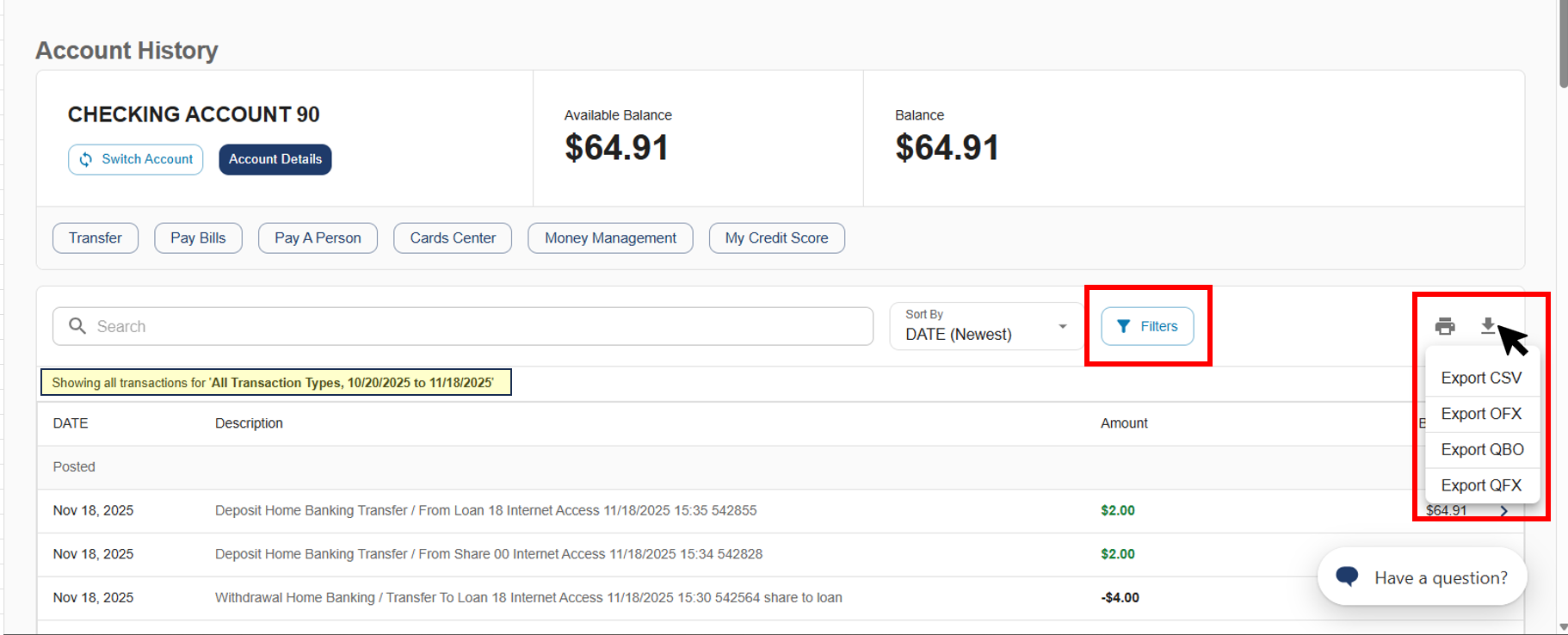
  2. While in Account History, set the dates of the transaction history you'd like an export of using the filters button (up to 12 previous months).
  3. Then you'll be able to export your transaction history to a spreadsheet by clicking the "down arrow" icon, which will give you export file type options.

Export Transaction History 2024

With My Credit Score, available through WPCU’s Mobile and Online Banking, you have instant access to your credit score, credit report, helpful tips for improving your credit, and personalized offers. It’s just one more way WPCU is providing you additional value and helping you achieve greater financial flexibility and freedom!

You can access My Credit Score through Mobile or Online Banking. To learn more about My Credit Score, click here.

Download transcript

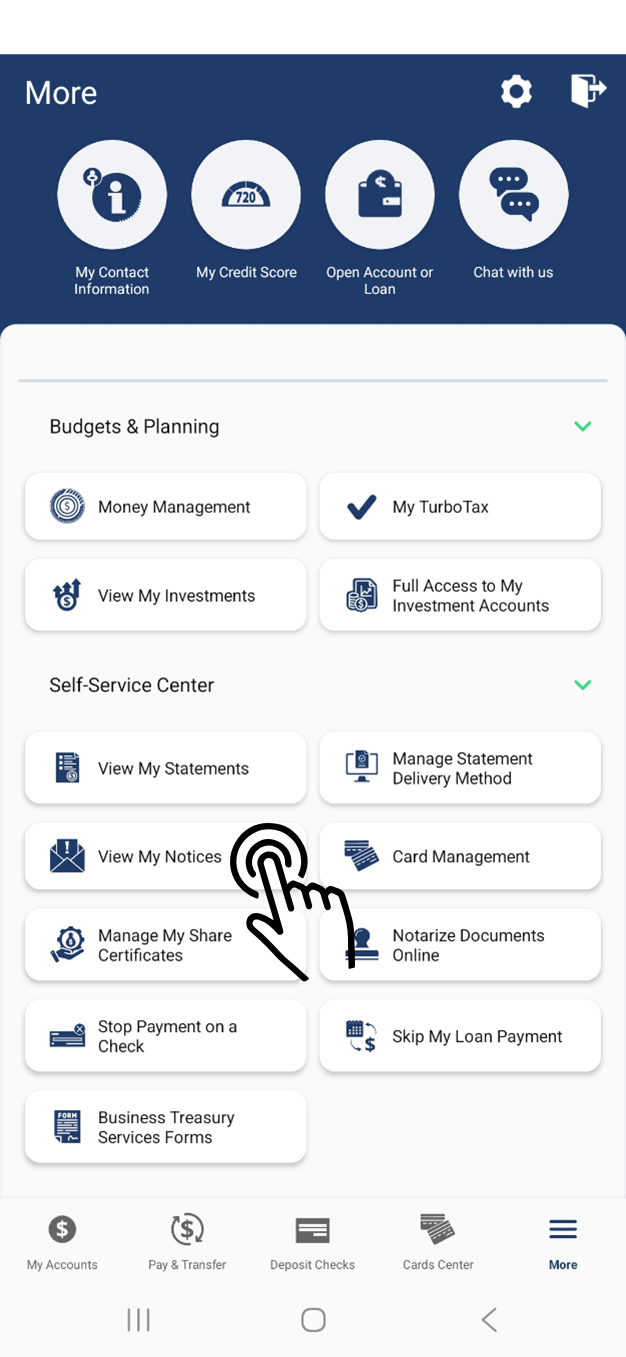
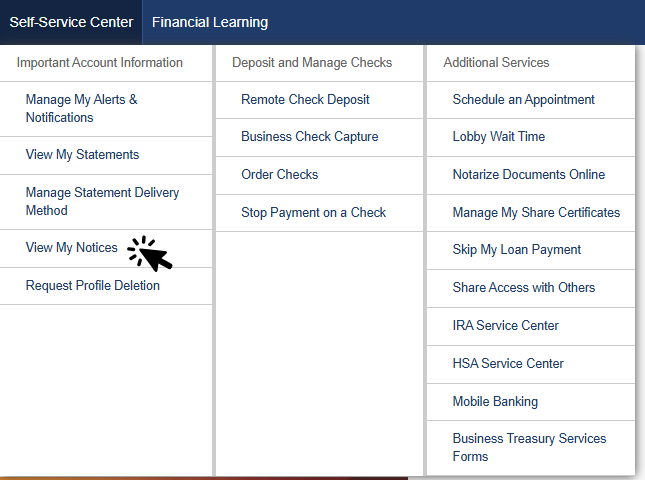
Did you know you can view your statements in WPCU's Mobile or Online Banking? Simply log in and navigate to the Self-Service Center, then select "View My Statements."

Access current statements, tax documents, and even archived statements.

Once you’ve accessed your eStatements, be sure to opt-out of receiving paper statements in the mail. Opting out of paper statements allows you to:

  • Help reduce paper waste by opting out of paper statements, and only printing the statements you need.
  • Securely access all of your financial documents, including Tax Statements, Credit Card Statements and even Archived Statements.
  • Store your important documents in one place, which makes searching for your financial documents a breeze.

Click here to learn more about eStatements »

Other Mobile and Online Banking Tips

At Wright-Patt Credit Union, our first priority is to keep our members’ accounts and information safe and secure. But with identity theft and financial fraud on the rise, it can be difficult to keep personal information out of the wrong hands. That's why it's more important than ever to be aware of what you can do to protect your personal information, in addition to WPCU's safety and security measures already in place.

WPCU also provides helpful tips, tools and resources to empower you with the latest information and strategies to better protect yourself from fraud. Watch the videos below to learn some of these tips, including keeping your account secure.

Download transcript
  • Mobile & Online Banking Tips: Multi-Factor Authentication

    Download transcript
  • Staying Secure Online

    Download transcript

When you log in to WPCU’s Mobile or Online Banking from a new device, you may be prompted to verify your identity via Multi-Factor Authentication (MFA). WPCU now offers the ability to link your account to an authenticator app so you can verify your identity quickly and securely. Watch the video below to learn how to link your WPCU account to an authenticator app.

Download transcript

Did you know you can save time and simplify bill paying by setting up automatic payments?

You don’t have to schedule a payment manually each month, leave home to pay a bill or go to multiple websites to pay. Simply set up recurring payments and different rules tied to your eBill, like minimum amounts, making spending and managing your money wisely even easier.

Give yourself the peace of mind with setting up automatic payments so you can focus on your next step when it comes to your financial flexibility and freedom journey. 

Download transcript

Save time and money with WPCU's Mobile Deposit. Whether you need to deposit Christmas and holiday gifts or your tax refund, Mobile Deposit makes it quick and easy. If you can take a picture, you can make a deposit. Just Tap, Snap and Deposit!

Did you know you can see the status of your check deposits within our WPCU Mobile App as well? Simply tap "History" on the Check Deposit screen. The Check Deposit Statuses include pending, rejected or accepted. If your remote deposit has a rejected status, it will include the reason why the deposit was rejected along with next steps.

Here are some tips to make sure your Mobile Deposit processes smoothly:

  1. Mobile Deposit will auto-detect the check amount. Make sure this amount matches the amount on the check.
  2. Remember to sign the back of the check, and endorse "WPCU Mobile Deposit".
  3. Choose a well-lit spot to capture the check images.
  4. Try to avoid shadows.
  5. Lay the check flat and on a dark background.
  6. Ensure all four corners of the check are visible and you can see the entire check from edge to edge in the image, including the MICR numbers located at the bottom of the check.
  7. Keep your hands clear of the check when taking the photo.
  8. Now just tap "Submit"!

Watch the below video for more information on Mobile Deposit, available in WPCU's Mobile App!

Download transcript

Once you’ve enrolled in Mobile and Online Banking, you want to make sure you keep your account as secure as possible. WPCU offers Multi Factor Authentication (MFA), adding an extra layer of protection to your account when logging in. However, it is still important to regularly update your password to keep your account secure. Did you know it’s recommended to update your password every 3 months? Follow these steps to update your information:

Update Username/Password in Online Banking:

  1. Login to Online Banking
  2. Select “My Settings” in the top right
  3. Scroll to “Login & Security” section
  4. Click “Edit” next to your Username or Password
  5. Update accordingly

Update Username/Password in Mobile Banking:

  1. Login to the WPCU Mobile App
  2. Select “More”
  3. Select the Gear Icon
  4. Click “My Settings”
  5. Locate the “Login & Security” section
  6. Click “Edit” next to your Username and Password
  7. Update accordingly

Click here for an interactive demo to help you learn more about Mobile and Online Banking.

WPCU's Money Management tool, available through Mobile or Online Banking, is a great way to look at your whole financial picture – including accounts and credit cards with other financial institutions, store-specific credit cards, retirement accounts, and more! You'll also be able to prioritize your debts with a payoff calculator, build budgets, and track your spending.

To access Money Management in the WPCU Mobile App:

  1. Log in to the WPCU Mobile App
  2. Select the More Menu and choose Budgets & Planning
  3. Select Money Management
  4. Add accounts and credit cards from other financial institutions to view your whole financial picture

To access Money Management in Online Banking:

  1. Log in to Online Banking
  2. Under the Budgets & Planning tab, select Money Management
  3. Add accounts and credit cards from other financial institutions to view your whole financial picture
Download transcript
Download transcript

Card Management is a feature within Mobile and Online Banking that allows you to easily view and manage your active WPCU ATM, debit and/or credit cards. To access Card Management, simply navigate to the “Cards Center” menu in Mobile or Online Banking.

Card Management offers a variety of features to help you make life a little easier, including the ability to:

  • Turn your ATM/Debit or Credit Card On or Off
  • Report your card lost or stolen 
  • Request a replacement card
  • Simple instructions for resetting your PIN
  • Create custom nicknames for your cards

Watch the video below to learn more about Card Management!

Download transcript

Introducing Manage My Share Certificates, a new tool within Wright-Patt Credit Union’s (WPCU) Mobile and Online Banking. Beginning on the day your personal certificate matures, you can log in to either Mobile or Online Banking to make changes to your account. You have 10 days from your maturity date to:

  1. Renew your personal share certificate account and
    • Keep the same terms or select a new term, 
    • Add additional funding to your share certificate from your WPCU accounts, 
    • Or partially withdraw funds from your share certificate to be transferred to one of your other WPCU savings, checking or money market accounts. Please note that your account must meet the minimum balance requirements, depending on the dividend tier, to maintain your account.
  2. Or you can choose to close your personal share certificate account and withdraw your funds to be transferred to one of your other WPCU savings, checking or money market accounts.  

Watch the video below to learn how to manage your share certificate maturity with mobile and online banking. 

Download transcript
  • How WPCU Protects Against Fraud

    Find out how WPCU helps you keep your accounts safe and secure.
  • How You Can Safeguard Your Information

    The best way to protect yourself is to be aware of trending scams and never share your account information.
  • What to Do if You're a Victim of Fraud

    Think you might be the victim of financial fraud or identity theft? Take the following steps.

How WPCU Protects Against Fraud

Find out how WPCU helps you keep your accounts safe and secure.

WPCU helps you keep your accounts safe and secure.

  • WPCU accounts are federally insured up to $250,000 per ownership interest by the National Credit Union Association (NCUA).

WPCU will never do the following:

  • Directly link to Online or Mobile Banking or provide links to websites to authenticate your information.
  • Contact you via email, phone, or text asking you to provide personal information or update/validate your credentials.
  • Ask you to enter your personal account information directly in an email, chat box, or pop-up message.
  • Ask you to respond to an email, chat box, or pop-up message with your personal account information.
  • Threaten to close or suspend your account if you do not provide your personal account information.
  • Request your personal account information because your account has been compromised.
  • WPCU is here to help you keep your accounts and financial information safe and secure. If you have questions or concerns about your account, please contact us.

Keeping Your Personal Information Secure

Wright-Patt Credit Union uses several effective measures to keep your personal information secure.

  • When logging in to your Mobile or Online Banking account your answers to a series of personal questions identifies you as an authorized user when logging in to your home banking account.
  • If suspicious activity is identified on your account, you are contacted about the authenticity of the transaction in question.
  • WPCU members have access to identity theft assistance through Identity Fraud, Inc., as well as discounted identity protection plans.
  • Verified by Visa® works behind the scenes when you’re shopping online and uses advanced fraud-detection technology to confirm your identity. 

How You Can Safeguard Your Information

The best way to protect yourself is to be aware of trending scams and never share your account information.

Spoofing attempts are on the rise. 

Along with many other financial institutions, Wright-Patt Credit Union is continuing to see a rise in fraudulent attempts to gain unauthorized access to member accounts.

Fraudsters are contacting members via text messages and phone calls falsifying information to make it appear the texts and calls are from Wright-Patt Credit Union.

If you receive a text, call or email appearing to be from Wright-Patt Credit Union, do not do any of the following, no matter how legitimate, convincing, or urgent the request is.

  • DO NOT click on any links
  • DO NOT call any numbers provided
  • DO NOT enter any personal or account information, i.e., username, password, or security code into a website the text takes you to.

Delete the text or hang up the phone immediately and call Wright-Patt Credit Union directly at (937) 912-7000 or (800) 762-0047 or visit our website at WPCU.coop to log into Online Banking.

Click here to view examples of fraudulent texts and the fake WPCU site.

What to Do if You're a Victim of Fraud

Think you might be the victim of financial fraud or identity theft? Take the following steps.

If you’ve accidentally given out your personal information, or if you think you’re the victim of financial fraud or identity theft, take the following steps:

  1. Call WPCU’s Member Help Center immediately at (800) 762-0047. We can help you protect and secure your accounts.
  2. File a police report with local law enforcement.
  3. File a consumer complaint with the Federal Trade Commission (FTC) online at FTC.gov or by calling 1-877-FTC-HELP.
  4. If you suspect you're a victim of mail theft, notify the US Postal Inspection Service by calling 1-877-876-2455 or visit USPIS.gov to submit a mail fraud complaint form.
  1. Continue to monitor your account closely for 12-24 months for unusual activity.
  2. If you continue to suspect ID theft, report it to WPCU's Member Help Center immediately.

WPCU is ready to help you take action after fraud or identity theft! Please contact us with any questions or concerns.